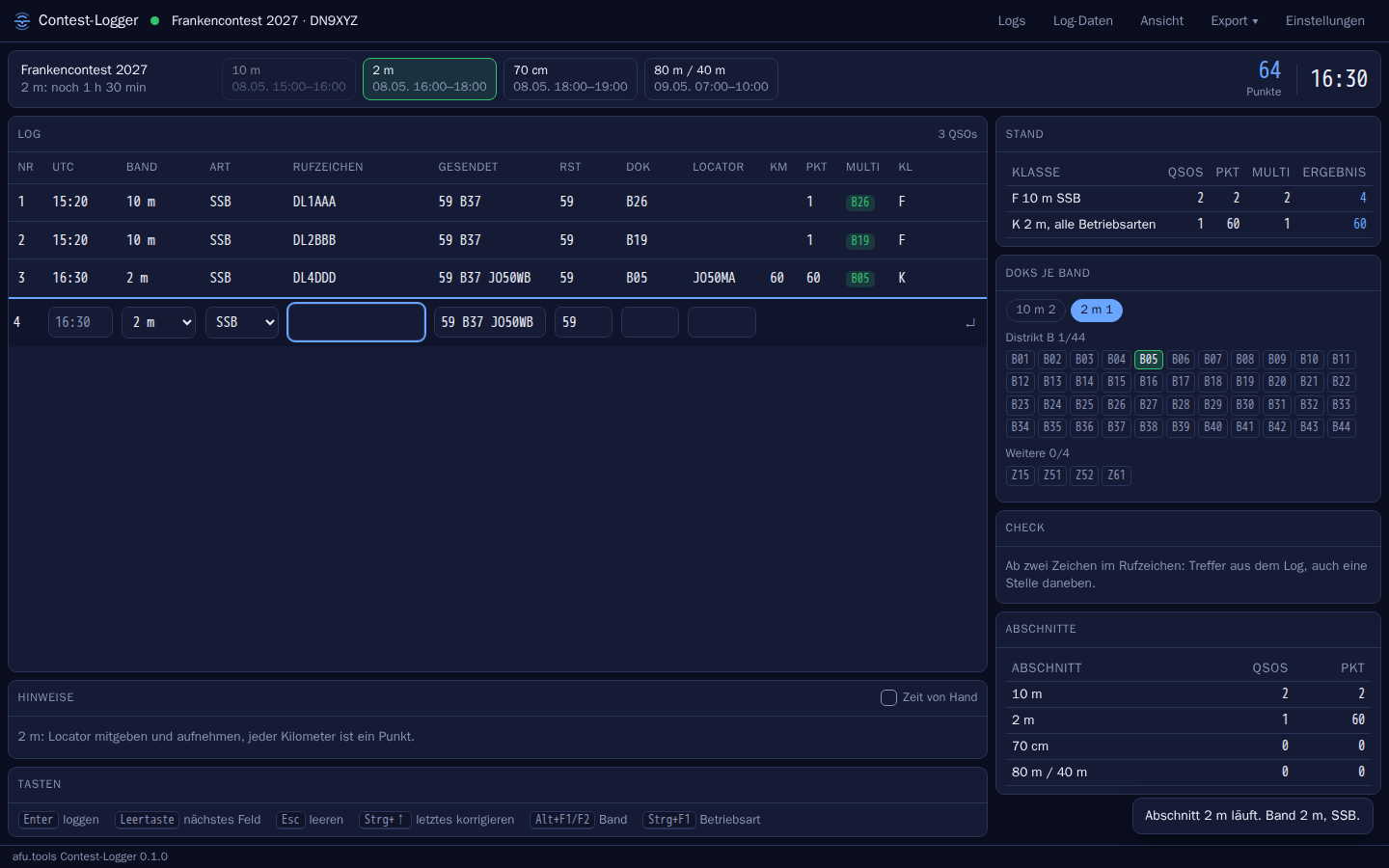
Scores like the official scoring
Points, kilometres, multis, dupes and categories come from the same rule set as the scoring in the contest module. What the logger shows is what counts later.
A layout per contest
Each contest can bring its own view: schedule, fields, multi grids (one per kind, for CQ WW zones and countries), texts. The Frankencontest has a ready-made one, everything else uses “Allgemein” (general). In a wide window all boxes grow with it; what you don't need you collapse with ▾ or hide with ✕, and Ansicht › Kästen (View › Boxes) brings it back.
Several categories in one log
In the Frankencontest each category counts on its own. You log everything in one log, the logger scores per category and writes one Cabrillo file per category. The DOK grid shows per band and category what's still missing: on 40 m a DOK counts once in CW and once in SSB.
Clear while you type
Dupe, new multi, points, country and kilometres are shown before you press Enter. The check knows over 80,000 contest callsigns, including ones a character off. It suggests DOK, locator and name: from your log, otherwise from the afu.tools callsign list. The zone (CQ or ITU, depending on the contest) comes from the country file, even where it changes within a country, like W6 in zone 3.
Offline
Everything lives on your computer. On start-up the logger fetches new contests, DOK lists and countries from afu.tools if there's a connection. Without one, the last state applies.
Rig and CW
Directly via USB (Yaesu, Icom, Kenwood, with auto-detect) or via rigctld, including to a running afu-remote station. Band and mode follow the rig, F1 to F8 send CW, ESM, Run/S&P, auto CQ, speed by key. CW also through your own WinKeyer, whose speed pot sets the speed in the logger. Footswitches that send keystrokes work like any key; PTT via footswitch goes straight to the rig.
Voice keyer and recording
You record F1 to F8 through the computer's microphone, and the logger evens out silence and volume. In SSB and FM they transmit like the CW messages, with ESM and auto CQ too: PTT via the rig, audio via its sound card. You enable this once, and Esc or a click elsewhere releases at once. You set the transmit level in the logger itself (in dB, works during transmission too, and the audio dialog can send any recording for level setting), independent of the sound card slider that other programs keep moving. If you like, you can monitor what's being sent on the computer's speaker. If your rig has its own voice memories that can be triggered via CAT (Icom, for example), F1 to F8 can use those instead: then no sound card is needed, and you hear the monitor tone right at the rig. The logger can also record what you receive; ▶ on a QSO plays from 20 s before to 10 s after.
Decoders, waterfall, digimodes
With the rig's sound card the logger decodes CW, RTTY, FT8 and FT4, the same decoders as in the remote control. Heard callsigns become buttons, and Alt+D pulls the exchange since your last transmission into the fields. The waterfall shows spots, decodes and your transmit tone, and a click tunes. For RTTY, F keys, ESM and auto CQ send audio from the computer; in FT8/FT4 you call by double-click or call CQ, and the sequence runs by itself up to logging. If you prefer doing FT8 in your own digimode program, connect it via its UDP interface: decodes appear colour-coded (dupe, multi), a double-click makes the program call, and logged QSOs go into the log. You enable transmitting from the computer once under Ton (audio). FT8/FT4 decoding uses ft8_lib (MIT licence).
Two radios, antennas, rotator
Two entry lines: with one rig VFO A and B, with two rigs one each. Alt+V brings the other one to the front, and callsign and exchange stay with their radio. Auto CQ keeps calling on one while you search on the other; it never transmits on both. A switch box using the open OTRSP protocol switches transmit and headphones (Alt+B: stereo). Plus a band decoder per radio (via the box or an HTTP call on the LAN), antennas per band (rig socket, Antenna Bridge, HTTP) that the logger picks itself when you change band, and a rotator: Alt+K turns to the short path, Alt+L to the long path to the callsign.
With your remote station
The logger connects to an afu-remote station just like the control page: via afu.tools with the bridge key or directly on the LAN. The station's rules apply (operation, calendar, transmit rights). Every QSO also lands in the station's logbook, and what others log there on the control page comes into your log: both see the same.
Multi-op via afu.tools
Share a log: the other positions join with a code. Everyone sees the same QSOs, dupes and multis apply to all, and the session hands out the serial numbers. Plus chat, passing a station on (Alt+G) and skeds. Without a connection the logger collects and sends later. At a field day without internet, one logger offers the session on the LAN (port 8090, only from your own network); the others enter its address. Windows asks about the firewall once.
Band map and cluster
Spots from the DX cluster and, if you like, from the Reverse Beacon Network, rated against your log: multi in green, dupe struck through. “ohne Gearbeitete” (hide worked) removes stations already worked from map and list, “nur SSB” (SSB only, or CW, depending on the contest) removes everything in a mode that doesn't count there: so no CW or FT8 spots in an SSB contest. The mode comes from the spot comment, otherwise from the band plan. A click or Ctrl+↑/↓ takes over frequency and callsign. A coloured line in map and list shows where you are right now, and the view slides along as you tune. The clicked station stays marked until you pick another or tune away.
Statistics and target
Alt+S shows points per band, rate as a chart, time at the rig with breaks, run versus S&P, countries and directions. An earlier log or a number is the target, and the box keeps telling you whether you're ahead or behind.
Practise with a pileup
Alt+U creates a practice log: simulated stations answer your CQ, with speed, QSB, noise and impatient callers. You work them with the same keys, and the logger tells you what was logged wrong. Nothing is ever transmitted.
Test run
Don't wait for the contest: a test run creates a log in which the contest starts now. The sections run one after another (with or without breaks), and “▶ jetzt” (now) in the schedule brings a section forward. Points, multis, grids and hints are calculated as in the real contest. A test run never goes into your account and is never submitted.
WAEDC with QTC
Ctrl+Q sends or receives QTCs: the logger knows who may exchange with whom, how many are still possible with that station and which of your own contacts are still open. Header and lines go out in CW via the rig, and you can ask for repeats line by line. The QTCs count in the scoring and are in the Cabrillo file.
Listener log (SWL)
If a contest has an SWL category, you create a listener log. What a line contains comes from the contest's rule set: the heard station with its exchange, the station it worked with or without exchange, what counts as a dupe, blocked periods and how often the same worked station may appear. The heard station stays after logging, and Alt+T swaps the two. A listener log never transmits, and SWL reports don't go into the logbook. Cabrillo, ADIF and submission work as usual.
VHF/UHF
Kilometres and bearing as you type, a map of worked squares per band and EDI export per band with station, power and antenna in the header.
Live scores
If a contest on afu.tools shows live scores, the logger can report (Log-Daten, log data) QSOs, multis and score per category every two minutes. The contest page shows the table during the contest.
With your account
Pair once (confirm a code in your account), then every QSO also lands in your logbook on afu.tools, including corrections and deletions. Contests of the contest module you submit straight from the logger (Export › Einsenden). Without a connection it waits and goes later. Without an account everything stays on your computer.
Switching over and paper
You import a log from another program (ADIF or Cabrillo) as a new log, scored by the rules of the contest the logger suggests from the file. Your own callsign lists (callsigns only, or with DOK, locator or name, also as a table with a header row) add to the check and pre-fill. Summary and dupe sheet are available as PDF for printing. It checks the computer's clock against a time server at start-up and every 30 minutes and warns from one second off.
Nothing gets lost
Every QSO is in the file straight away, and deleted and changed ones stay in the history. After every QSO it writes ADIF and Cabrillo to the folder “sicherung” (backup).